Domain Name System (DNS)
So far, we've been working with IP addresses. We've come to understand the different types of addresses and how we use them in both networking and addressing. An IP addresses isn't really much use to everyday users however. They're a cumbersome and hard to remember way for people to access resources online.
DNS solves this issue by making networked systems addressable through a human-readable name. In essence DNS converts the human readable name into the (usually) IP address the system uses.
One example of this is upload.academy. Two English words combined with a . got you to this book. Then there's content.upload.academy, which is the actual "location" of the book itself. These are DNS hostnames and they identify a specific system on a network - in this case the public Internet.
And to be complete about this, the actual full hostname is upload.academy. - notice the final, lonely . at the very end on the right? That's the root of the hostname.
Breaking down a DNS hostname
Not many people know this, even some already in IT, but a DNS hostname or address is read right-to-left, not left-to-right. We read and write it from left-to-right because that's what easiest given that English is a left-to-right language. But computers read DNS hostnames from right-to-left.
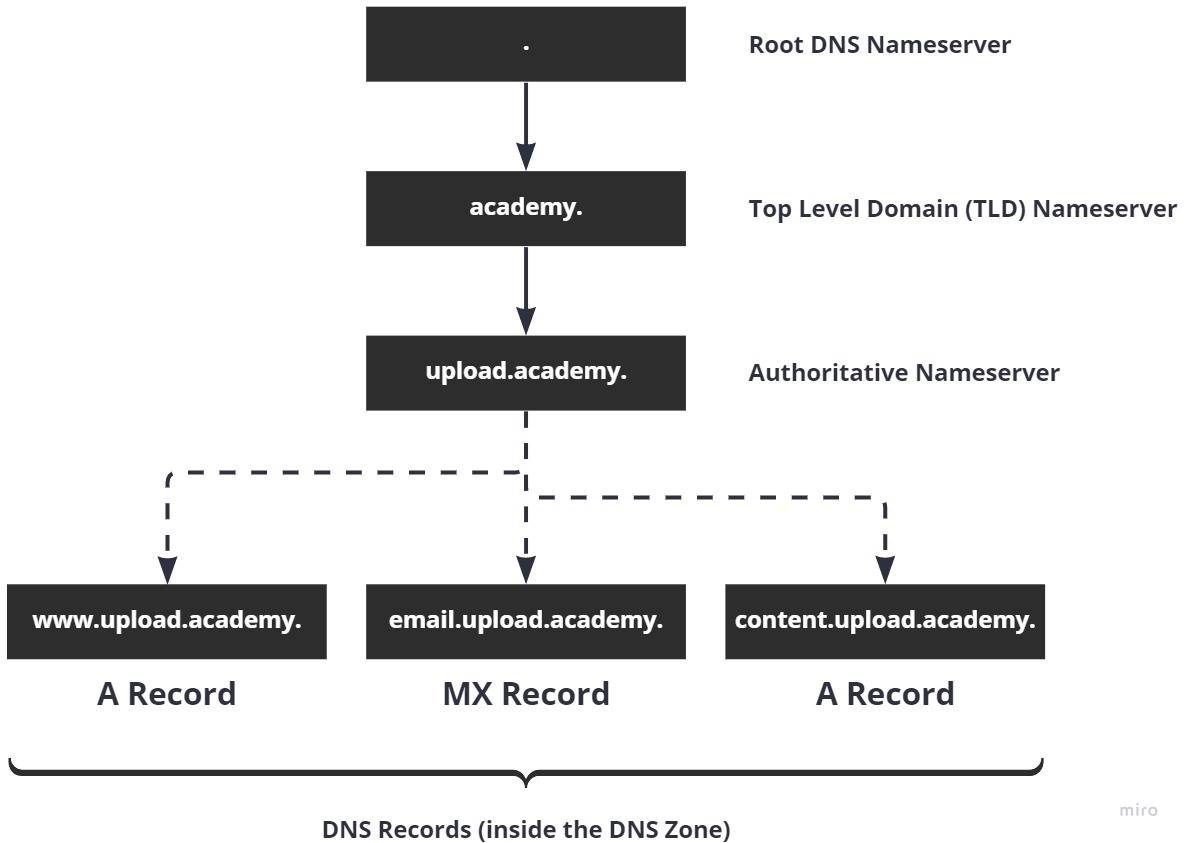
The root of the entire address is at the right side and .. Following this (going right-to-left, remember) is the Top Level Domain (TLD), academy. Now we have the second-level domain, upload, which gives us upload.academy. Finally we get the Authoritative Nameserver at upload.academy. which contains all the DNS records.
Visually this looks like this:
Other TLDs
Other very common, well known examples of Top Level Domains (TLDs) include com, com.au, net, edu, org, co.uk and many, many, many more. There are thousands of them and not all of them are open to the public, like edu, mil and gov.
TLDs are managed by ICANN (Internet Corporation for Assigned Names and Numbers). Here's a list of all supported and available (with restrictions) TLDs: https://data.iana.org/TLD/tlds-alpha-by-domain.txt
How many are there? About 1,486.
Record Types
Above we've seen some record types being listed: A, CNAME, and MX. When we create DNS records inside of a DNS zone, we need to define a record type so that the DNS system knows what kind of response to expect. The type is also used by DNS servers so that it knows what to look up when the DNS client asks for MX records (for example.)
There are many record types:
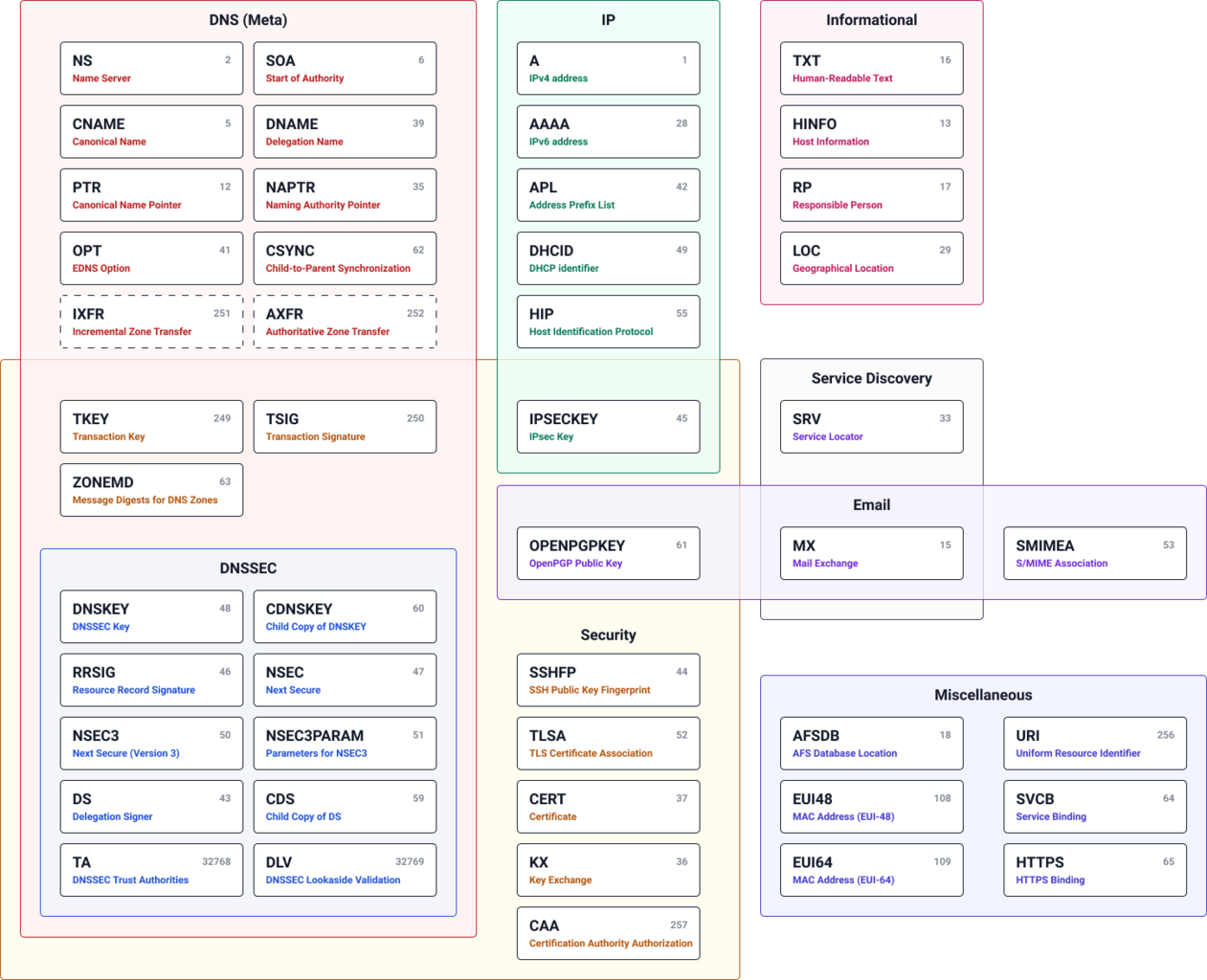
Here's the list in text format should you want to reference it or go into more depth (no need to at this point in time): https://en.wikipedia.org/wiki/List_of_DNS_record_types.
And here are the most common you'll use day to day:
AAAAACNAMETXTMX
I've barely touched the other record types in my entire career, but that's not to say you won't.
DNS Resolution
But where is this information kept? What's actually being referenced when a client looks up the location of upload.academy?
Here's the process:
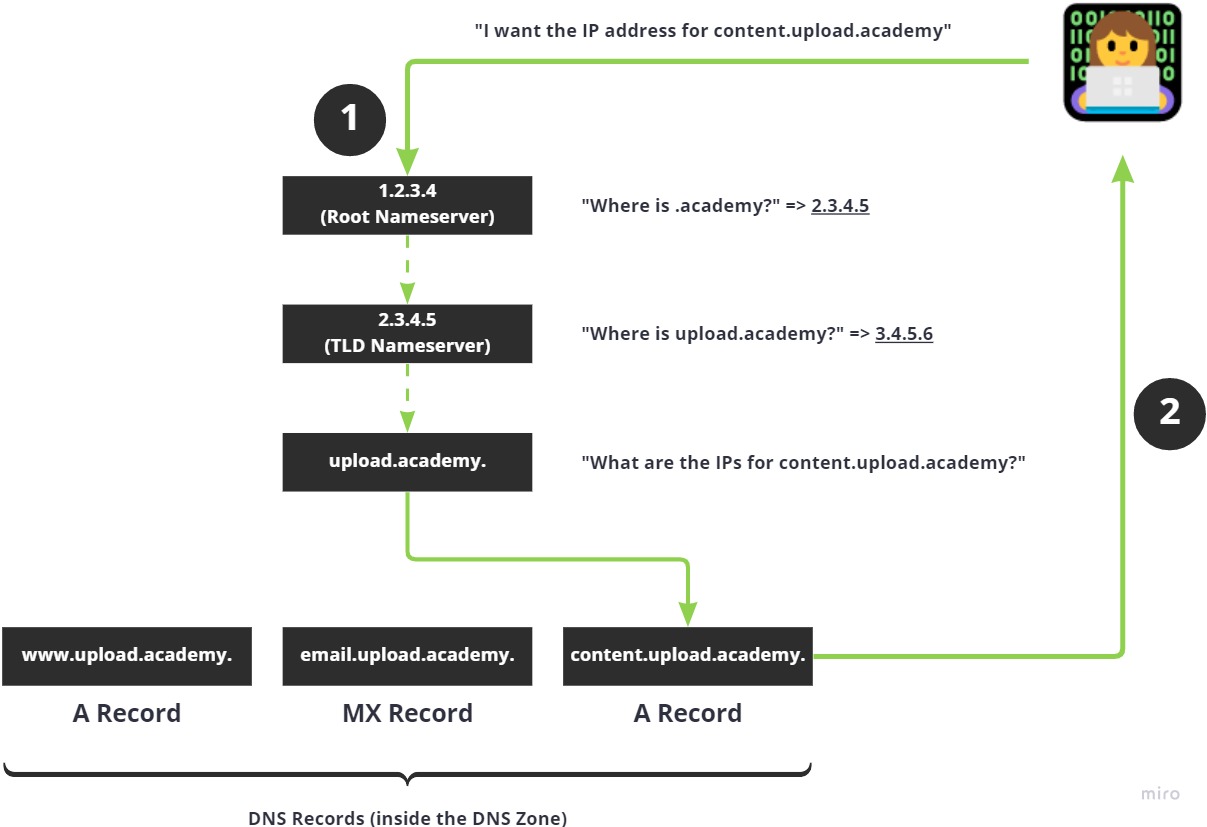
- Your (local) DNS client looks in the local cache of DNS information for
upload.academyand does not find it - Your computer then goes to the root DNS nameserver and asks it, "Where can I find information on
.academy?" - The root DNS server replies and tells your DNS client the IP address of the TLD DNS nameserver, because
.academyis a TLD - Your DNS client contacts the TLD DNS nameserver and asks it for the authoritative DNS nameserver for
upload.academy, which is a second-level domain (uploadis secondary toacademy) - Then, your local DNS client caches (saves for later) the results of the nameserver IP address for
upload.academy - Finally you can ask the
upload.academyauthoritative nameserver for information aboutupload.academyrecords and it'll give you the IP address of the record or records
With the IP address from the final step, your local client, whatever that may be, can make a connection to the IP address and start talking to our servers here at Upload Academy.
Nameservers
The term, "nameserver" has been thrown about a lot. What does it mean?
A nameserver is a DNS server that holds DNS records for a given part of the DNS system.
At the root level (.) is the root nameserver, which contains DNS records for all of the global TLD nameservers (academy, com, edu, etc.) The root nameserver does not contain any information about the TLD except where to find the IP address(es) of the nameservers that manage the TLD.
Then we have the TLD nameserver that represents and manages DNS records for the authoritative nameservers like upload, google, linkedin, etc. This nameserver knows where the authoritative nameserver is located (it's IP address) and is the final part of the DNS lookup process.
Finally, the authoritative nameserver knows all of the records for the DNS zone.
Visually this might look like this:
Authoritative Nameserver
Finally let's talk about the authoritative nameservers.
These are responsible for managing all the DNS records that represent a domain name. For upload.academy, for example, we might have the following records:
| Record Type | Hostname | IP Addresses |
|---|---|---|
A |
upload.academy |
1.2.3.4, 2.3.4.5 |
CNAME |
www.upload.academy |
upload.academy |
MX |
mail.upload.academy |
3.4.5.6 |
And so on.
These records are looked up by DNS clients, at the request of things like web browsers, so that the final result, usually an IP address, can be obtained and used to make a connection to a remote system in another network (using TCP, UDP, etc.)
These zones are managed by the entity, a person or an organisation, that owns the domain name. They can create whatever records they like and then can return whatever IP addresses they like. Or none at all.