User Datagram Protocol (UDP)
UDP is quite different from TCP. The end goal is the same: get data from the client to the server and back again (if desired) but the way in which UDP operates is simple compared to TCP. That might seem like an advantage but as we'll see shortly UDP isn't ideal for all types of connections and workloads.
When we looked at TCP we learned that there is a three-way handshake, a connection is established, the connection has a state, data is sent and the receiving party confirms it got the data, and so on. We compared this process with a postal system analogy with the sending of a letter. The application writes the letter (packet) and the postal system (TCP) sends it and verifies it got delivered. Let's recycle that analogy.
With UDP the delivery of the letter looks like this:
- Write the letter (data)
- Give it to the post office (UDP)
- They put in an envelope (datagram)
- They sign it with the address (IP) of the recipient
- They also include the port number in the address
- ... and then they fire it out of a cannon and forget about it
No really: UDP is basically a "fire and forget" protocol. It does nothing to confirm the datagram (not packet - that's TCP) was received by the remote endpoint. With UDP you send the datagram and you forget about it. It's all about the application sending and receiving the UDP datagrams doing their own work to check everything was received or not.
This might seem a bit useless but it is actually very useful.
UDP a very fast protocol. Sending datagrams is a simple process because no connection needs to be established ahead of time. Instead you only need the IP address and port of the UDP endpoint and then you start sending datagrams to it. The remote endpoint that's listening for connections on the UDP port then receives the datagrams and decides what to do - reply, not reply, etc.
TCP differs in that you have to setup the connection, via the handshake, before sending data. UDP doesn't require this setup and as such it can be seen as far more efficient and a lot faster when you're dealing with a lot of clients.
Use Cases
I think the nature of UDP makes it hard to understand why you'd use it versus TCP. Let's review two common use cases that will help us better understand why UDP's design is useful.
You use this one every day, even when you're not actually using a computer or your mobile phone: DNS. I won't go into the specifics of DNS as we do that later on, but in short DNS is about taking a hostname like "google.com" and translating it to an IP address (or multiple IPs) which can then be used to connect to a remote system. The size of the information that is returned from a DNS system is very small, so setting up an entire TCP connection would be a waste of time and resources. Instead UDP allows us to fire off a datagram, wait for the reply and be done with it. That's it - no setup, no shutdown.
You might also be surprised to know that online games such as Final Fantasy 14, World of Warcraft, and many more, use UDP whilst you're playing. This is how your client sends information to the remote server about what you're doing in the game and the server replies accordingly, all via UDP.
Another use is discoverability. That is to say that UDP is ideal for discovering other services on the network without having to wait for a reply. Remember that TCP requires that you setup a connection before sending data. UDP does not, so if you're looking for another service or set of services on your local network (like a new printer, for example) then sending out hundreds, even thousands, of UDP datagrams is better than waiting for a TCP connection to be established, fail, and then trying again on another IP address.
Let's review that last one in a bit more detail as I think it helps explain UDP really well.
Firstly, you have a new printer on the network. The printer is waiting for you to set it up by connecting to it. On your local network the printer has the IP address 192.168.0.47, but you don't know that yet. Your PC's IP address is 192.168.0.14.
With TCP discovering the printer's IP address would involve connecting to every IP address on your local network. In this case that could be upwards of 254 IP addresses. What your printer configuration software would have to do is:
- Connect to the first IP address
- Wait for a reply
- When it doesn't get one, it'll time out, which can take minutes at a time
- Then try the next IP
If there are 254 IP address to try and each one has a timeout of one minute, then you're looking at long wait for the software to find the printer. But with UDP you simply construct the datagram and then fire off 254 datagrams across all the IPs, at the same time, and see which ones come back. It's nearly instant.
That's why and how UDP is a useful protocol.
Common Ports
We know this list is for now, so let's get to it:
| Port | Software/Use |
|---|---|
53 |
Domain Name System (DNS); but it's actually used via UDP mostly |
80 |
HyperText Transfer Protocol (HTTP); version 3 uses UDP via the QUIC protocol |
123 |
Network Time Protocol (NTP); keeping your system clock in sync |
443 |
HTTP Secure; a.k.a "the web" but encrypted/secure; v3 uses UDP via QUIC |
1433/1434 |
Microsoft SQL Server |
3389 |
Windows Terminal Server (RDP) |
Stateless
Remember when we described TCP as stateful? UDP is stateless. It's a fire and forget protocol. There is no state maintained at the protocol level. Instead, it's maintained at the application level - the application constructing datagrams and using UDP to send them, so it's the application's responsibility to check if it was delivered or not.
The Header
As with TCP we'll look at the UDP header as well. You'll see just how simple UDP is compared to TCP:
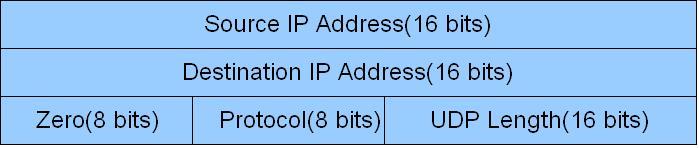
The amount of information in a single datagram compared to a TCP packet is pretty crazy. A UDP datagram is essentially as minimal as you can get with only five fields compared to TCP's 10 mandatory fields. This is why UDP doesn't offer the same guarantees as TCP: it's literally not designed to offer them.